Clear markups
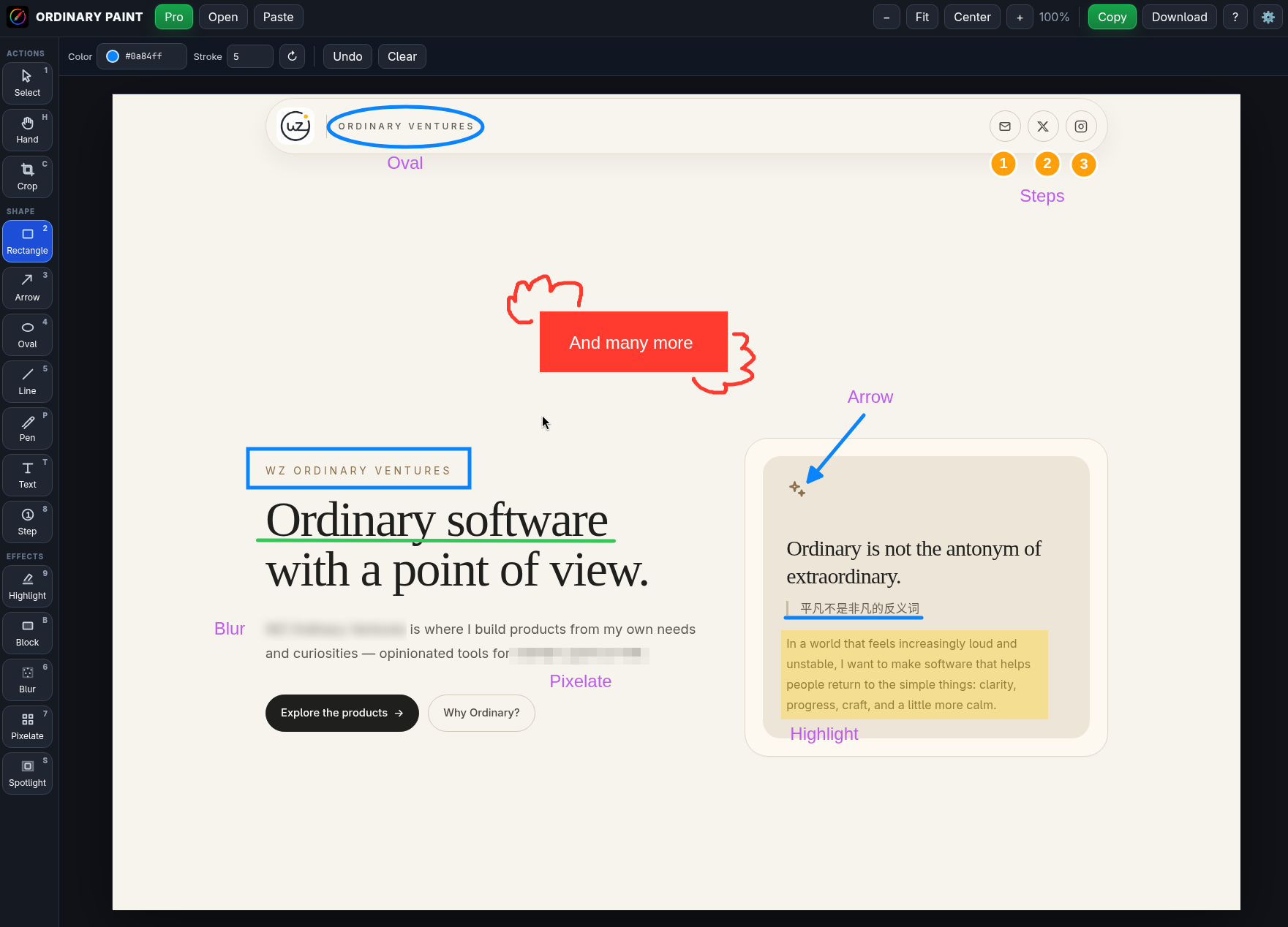
Add arrows, rectangles, ovals, lines, text, step markers, highlights, and callouts — then select, move, resize, and edit them as you refine the screenshot.
Ordinary Paint is a focused screenshot annotation app for Linux, built for quickly adding arrows, shapes, text, blur, pixelation, steps, highlights, and clean visual notes.
After switching from macOS to Linux, one of the small things I missed every day was fast, polished screenshot annotation.
I did not want a full design tool. I wanted something simple: paste a screenshot, mark it up, copy it, and move on.
The tools I tried were useful, but none of them quite matched the workflow I wanted:
So I built Ordinary Paint — a small, practical screenshot annotation app for Linux users who care about speed and clarity.
Add arrows, rectangles, ovals, lines, text, step markers, highlights, and callouts — then select, move, resize, and edit them as you refine the screenshot.
Blur, pixelate, or block sensitive areas before sharing screenshots with teammates, customers, or the internet.
Paste an image, annotate quickly, then copy or download the finished screenshot without building a whole design workflow around it.
Customize keyboard shortcuts for the tools you use most, so your annotation flow stays fast and familiar.
Flatpak is recommended for most Linux desktops. If you use an Arch-based distribution, the AUR package is the fastest path. AppImage is available as a portable fallback.
Download the Flatpak bundle from the latest release, add Flathub if needed, then install it locally. Flatpak may install the Freedesktop runtime and related extensions the first time.
flatpak remote-add --user --if-not-exists flathub https://flathub.org/repo/flathub.flatpakrepo
flatpak install --user ./ordinary-paint-0.1.3-linux-x64.flatpak
flatpak run works.ordinary.paintInstall the binary package with your favorite AUR helper.
yay -S ordinary-paint-bin
AUR
Download the AppImage, make it executable, and run it directly.
chmod +x ordinary-paint-0.1.3-linux-x86_64.AppImage
./ordinary-paint-0.1.3-linux-x86_64.AppImageBasic tools like Select, Hand, Rectangle, Arrow, Oval, Line, and Text are available for free.
Upgrade with a one-time USD 10 purchase to unlock all Pro tools and customization.
Your license includes free updates and can be activated on up to 3 devices.